Inside an order
Warehouse photos: checking the item, and checking that someone took them
QC photos do two jobs at once. They show whether the seller sent the right thing, and they show that a warehouse with people in it is handling your goods this week. This page covers both.
Sections on this page
What warehouse photos prove, and what slips past them
QC stands for quality check. When the seller’s parcel reaches the agent’s warehouse, a staff member opens it, compares the contents with your order and photographs the item, usually laid flat on a table. Most agents include a few photos free and charge for extra angles, measurements or close-ups. How many photos Upopbuy included is not in its listing or the archive; the app only named “Quality inspection services” as one of its four main entries.
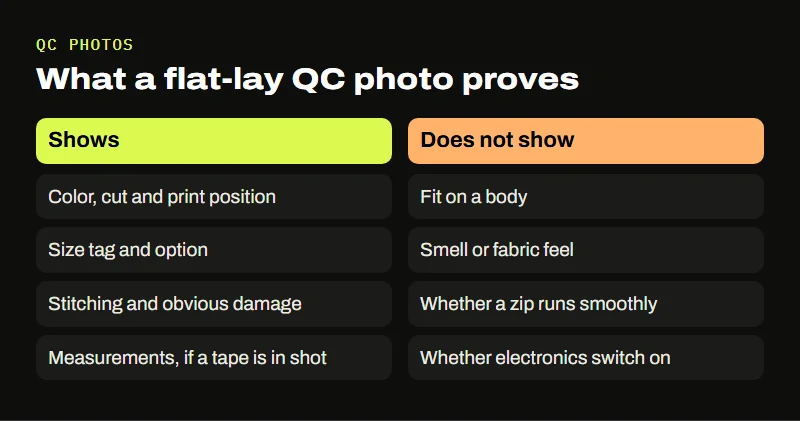
Photos show color, shape, print position, stitching, labels and obvious damage. They do not show fit on a body, smell, how a fabric feels, whether a zip runs smoothly, or whether an electronic item switches on, unless you ask and the agent agrees to test it. Knowing the edge of what the photos can prove keeps you from approving something on the strength of a picture that never showed the problem.
A fixed five-step reading for each batch of photos
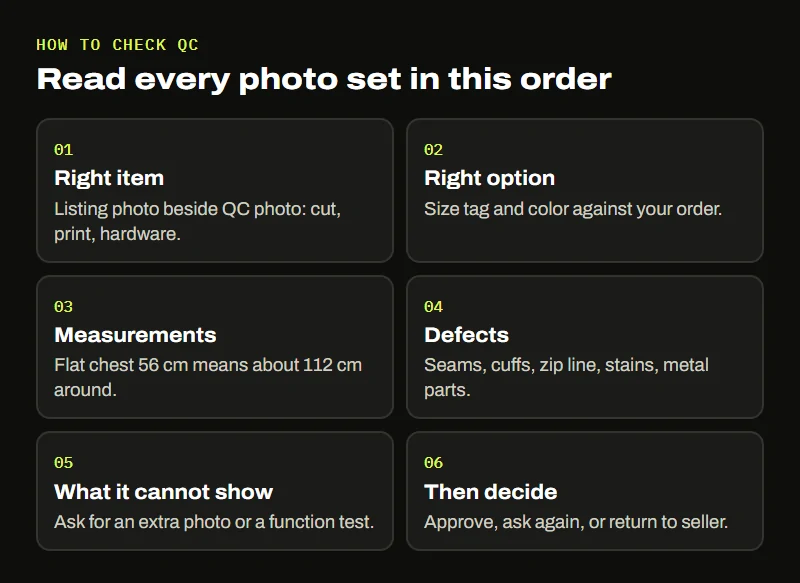
Our way of reading QC photos never changes order. Read every set in the same order, so you never skip a step because the first photo looked good.
- Right item. Put the listing’s main photo next to the QC photo. Same cut, same print, same hardware?
- Right option. Find the size tag or label and the color. Sellers mix up options more often than they send the wrong product.
- Measurements. If you paid for a tape measure photo, compare it with the seller’s chart. Many Chinese size charts give the garment laid flat, so a “chest 56” means 112 cm around.
- Defects. Zoom in on seams, cuffs, the zip line, stains and loose threads, and on any metal parts.
- What the photo cannot show. Decide whether you need an extra photo or a function test before approving.
Some examples from our own shelves: for the pearl stud earrings, ask for a close-up of the post where a silver stamp should be, and check that the two pearls are a matched pair. For a knit beanie, a photo of it stretched across a ruler tells you more than a flat one. For a fleece zip-up, ask for the zip half open, since cheap pulls are where these fail first. For a digital watch, ask whether the display was switched on; a battery that arrived flat is common and easy to sort out before shipping.
Signs the photos came from a working warehouse this week
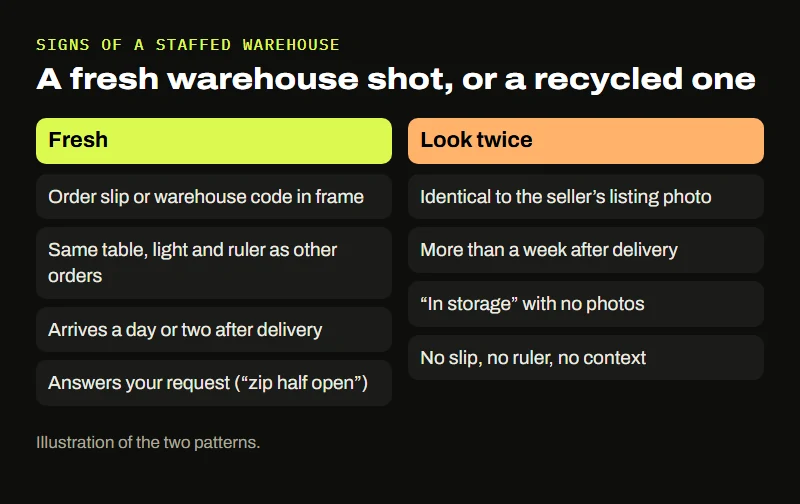
For the purposes of the six signals, a photo set is also evidence about the agent. Things that suggest real, recent work:
- A paper slip or sticker in the shot with your order number or a warehouse code.
- The same table, light and ruler across different customers’ photos, which shows a fixed photo station.
- Photos that arrive within a day or two of the seller’s tracking showing delivery to the warehouse.
- A staff note that answers your earlier request (“zip shown half open as asked”).
Things that should make you look twice: photos that match the seller’s own listing images exactly, which means nobody photographed your item; photos that take more than a week after delivery; and repeated “in storage” status with no photos at all.
Storage deadlines weigh more when the lamps dim
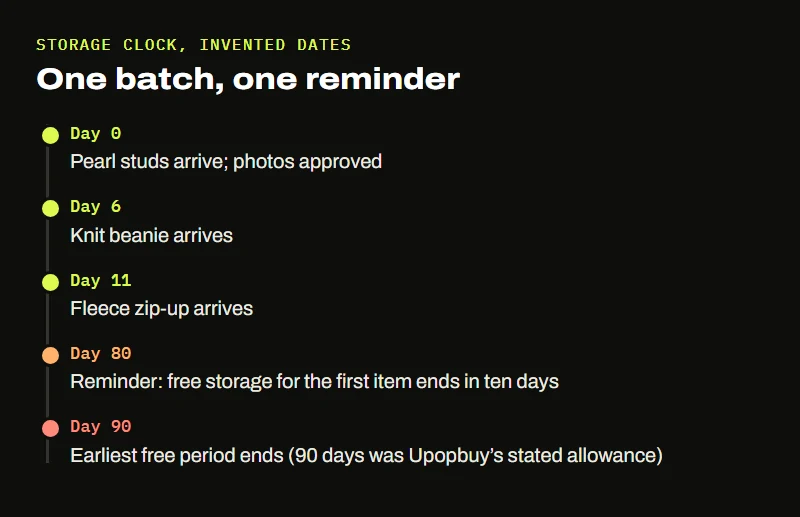
Most agents give a free storage period counted from the day an item arrives at the warehouse, then charge for each extra day or dispose of goods after a final date. Upopbuy’s listing claimed 90 days free. Our habit: write the arrival date next to each item and set one reminder for the earliest end date in the batch.
A long free period invites you to keep adding items for months. That is convenient while an agent is healthy and risky while you are unsure about it, because everything in storage is waiting on the agent to answer. If two or more of the six signals have gone quiet, the signal reader will suggest asking for a parcel with what is already there before adding anything new.