Tools on this site
Signal reader: tick what you saw, get a plain next step
Sixteen warning signs grouped under the six signals. Tick only the ones you saw yourself; the reader weighs them and gives one of three answers: carry on, pause new payments, or ship out what is already in the warehouse first.
Sections on this page
Tick the warning signs you saw yourself
Everything runs in your browser. Nothing you tick is stored or sent anywhere, and closing the page clears it.
Reading the reader honestly
Before ticking, a word on how to use this tool honestly. The reader sorts its sixteen signs into two weights. Serious signs are the ones that, on their own, stop an order from working: the address does not resolve, the checkout errors out, mail bounces. Softer signs are things a working agent can also show for a while: a quiet Instagram, an app nobody has updated since spring, a slow ticket queue.
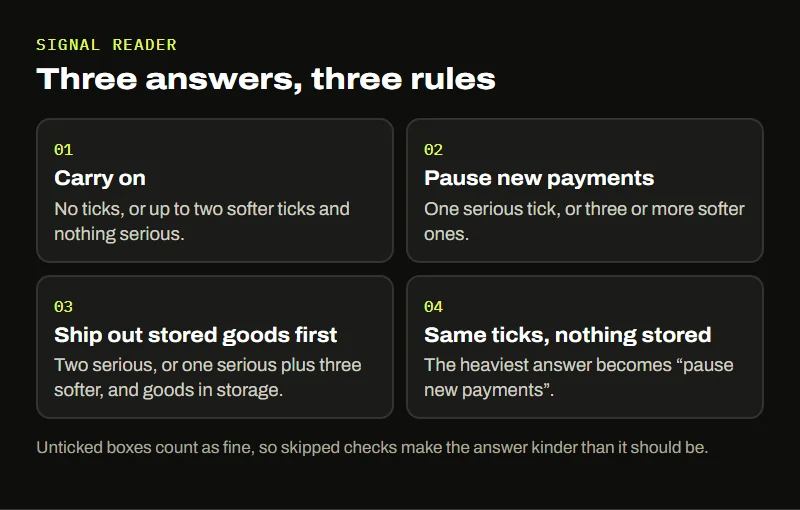
The answer follows three rules, and you can check them against your own ticks:
- No ticks, or up to two softer ticks with nothing serious: carry on, keeping each payment small.
- One serious tick, or three softer ones: pause new payments until the sign clears.
- Two serious ticks, or one serious plus three softer, while you have goods in storage: ship out what is already in the warehouse first. Without goods in storage, the same ticks give “pause new payments”.
The weak point is the unticked box. An empty box can mean “I checked and it was fine” or “I did not look”, and the reader cannot tell which. If you only checked two of the six signals, read its answer as more hopeful than the truth. The six-signal page shows what each check involves; most take less time than reading this paragraph twice.
Ticking every box gives the strongest answer the reader has. Ticking none gives “carry on” with a reminder to look again before the next payment. Try both ends once so you know what the extremes look like.
Silence counter for quiet channels
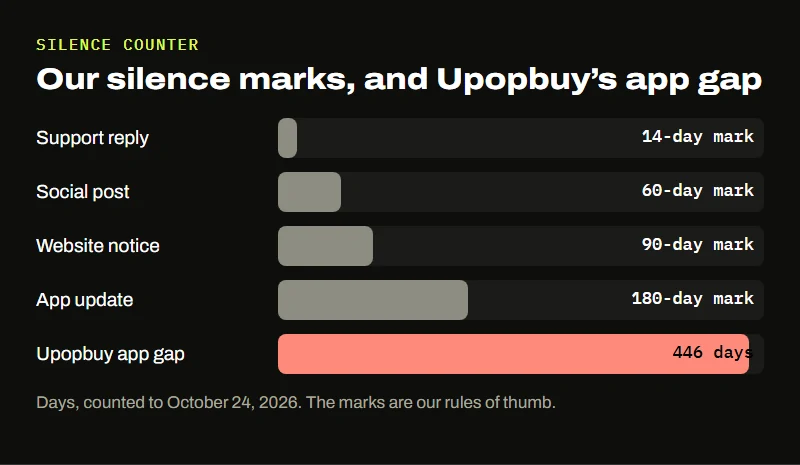
Some signals are dates rather than yes-or-no answers. Enter whichever of these four you can find, leave the rest empty, and the counter works out how many days each channel has been quiet as of the checking date.
Each date is compared against a mark we chose: 180 days for an app update, 60 days for a social post, 90 days for a website notice and 14 days for a support reply. These are our rules of thumb from watching agents, not industry figures, and a seasonal business can sit past one of them for good reasons. The pattern that matters is two or more channels past their marks together.
The example button loads the one Upopbuy date we can document: the newest iOS version, released August 4, 2025, counted to our check on October 24, 2026. That alone is 446 days, well past the 180-day mark. There is no official social account or website notice on record to add, which is why those fields stay empty in the example.
What neither tool can tell you
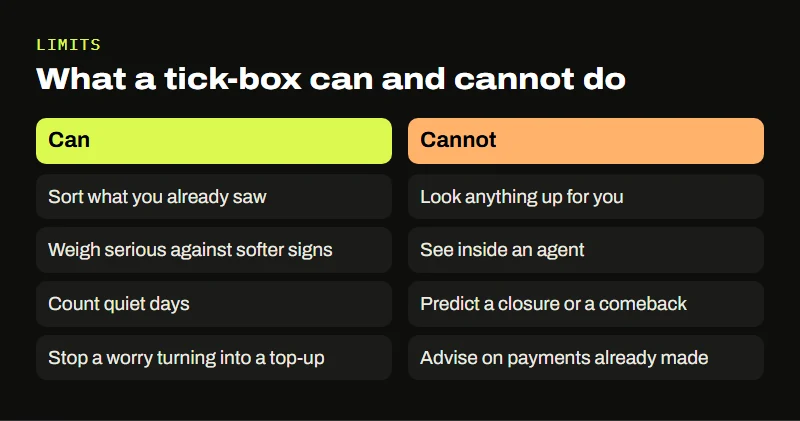
Both tools sort what you already know. They do not look anything up, and they cannot see inside an agent. A business can pass every check and still close next month; another can look half-dead from outside while it moves to a new address. The reader also does not handle money questions about payments already made: for those, the company that processed the payment is the one to ask about its own rules.
What the tools do well is stop a quiet worry from turning into a large top-up. If the answer is “pause”, pausing costs you a few days. If the answer was right, it saved you more than that.